


USB Arcade Game Trackball
Light up your next game with this 2-inch LED arcade trackball from PMD Way, with free delivery. Roll, aim and navigate with responsive trackball control, while the built-in lighting adds a retro arcade touch to your desktop or cabinet.
With USB plug-and-play connectivity and support for Windows, Linux and Android, it’s easy to add to a compatible gaming setup.
-
Classic arcade feel: A 2-inch ball puts hands-on control at your fingertips.
-
Built-in LED lighting: Add an illuminated centrepiece to your arcade controls.
-
Simple USB connection: Plug into a compatible system and get ready to play.
-
Multi-platform support: Works with Windows, Linux and Android systems.
-
Flexible placement: The 110cm cable gives you room to position the trackball where it suits your setup.
-
Made for arcade play: A practical addition for coin-pusher and other games that support trackball input.
Add a touch of arcade nostalgia to your next build.
By default the trackball appears as a USB joystick. Rolling the ball around moves the "mouse pointer" around.
The trackball supports mouse, keyboard, and joystick functions. Mouse mode is always active. The 2 × 14 GPIO pins on the underside can operate as either keyboard or joystick inputs.
Default mode
The GPIO pins default to joystick mode when the trackball is connected via USB. See Picture 1 for the joystick wiring diagram.
Switch to keyboard input
With the USB cable disconnected, press and hold Up + G.
Connect the USB cable while holding both controls.
Wait one second, then release them.
The GPIO pins will now use keyboard input. This setting is retained the next time you connect the USB cable.
Switch back to joystick input
With the USB cable disconnected, press and hold Down + Button 9.
Connect the USB cable while holding both controls.
Wait one second, then release them.
The GPIO pins will now use joystick input. See Picture 2 for the mode-switching diagram.
Reference diagrams (click to enlarge):
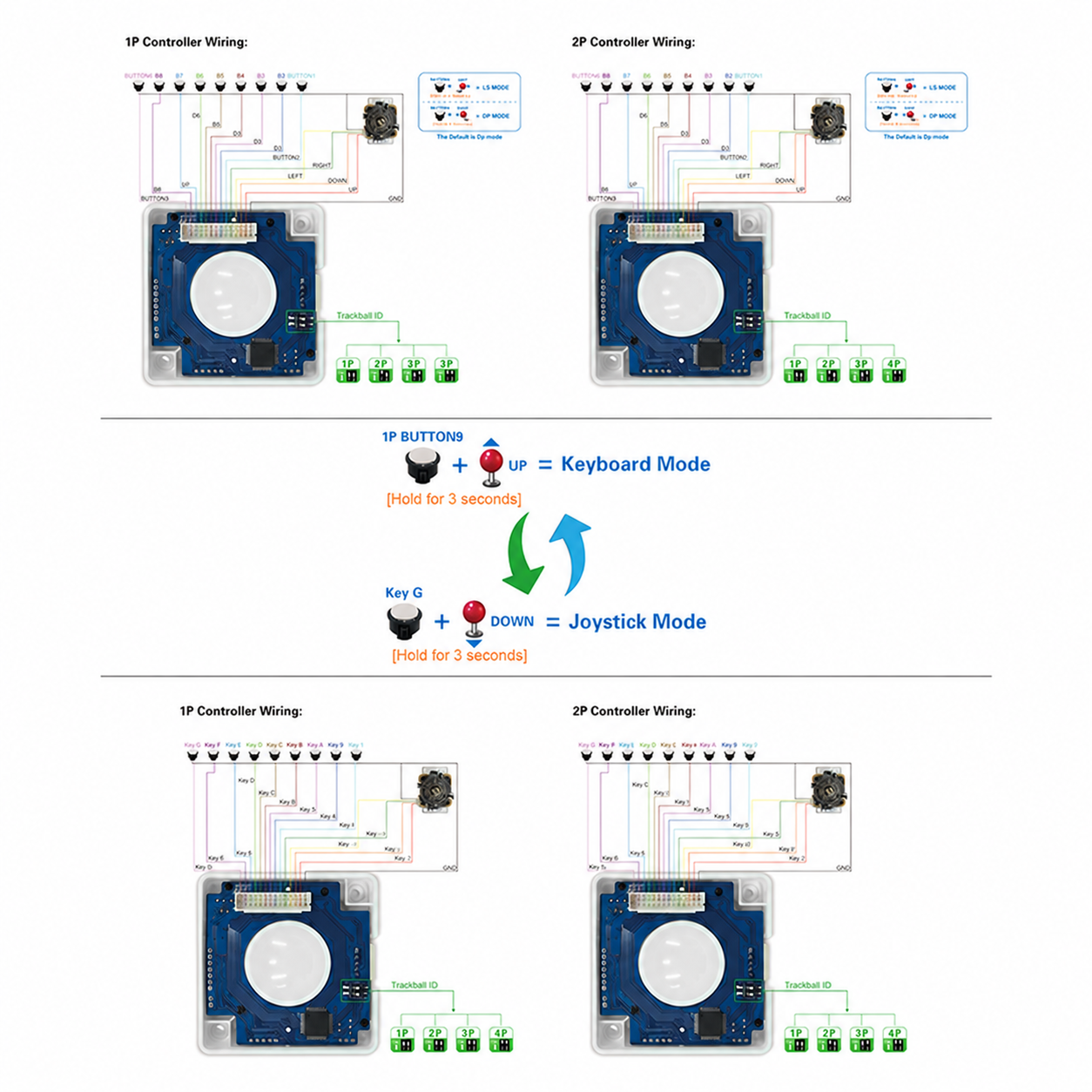
Picture 1: Joystick wiring
Picture 2: Switching between keyboard and joystick input
Picture 3: Keyboard wiring
Picture 4: Installation dimensions
Don't forget to check out our full range of switches if this doesn't meet your needs. And as always, all orders receive free delivery.
And remember ... if you:
- can't find what you need
- not sure what to order
- want a bulk deal
- need technical support
- or just want to have a talk ...
Please email us via support@pmdway.com.
To keep up to date with new products, news, tutorials and more - we're on x, Facebook, Instagram, threads, reddit, and instructables.